Supported Exchanges
All bots use post-only limit orders (maker) by default. Taker execution is reserved for stop-loss orders and delta neutral hedging only.
Why Maker-Only Matters
Most perpetual DEXs charge taker fees (2-5 bps) but offer maker rebates — meaning you get paid to provide liquidity. Since every Sigma Engine bot places post_only orders, you never pay taker fees and you earn rebates on every fill.
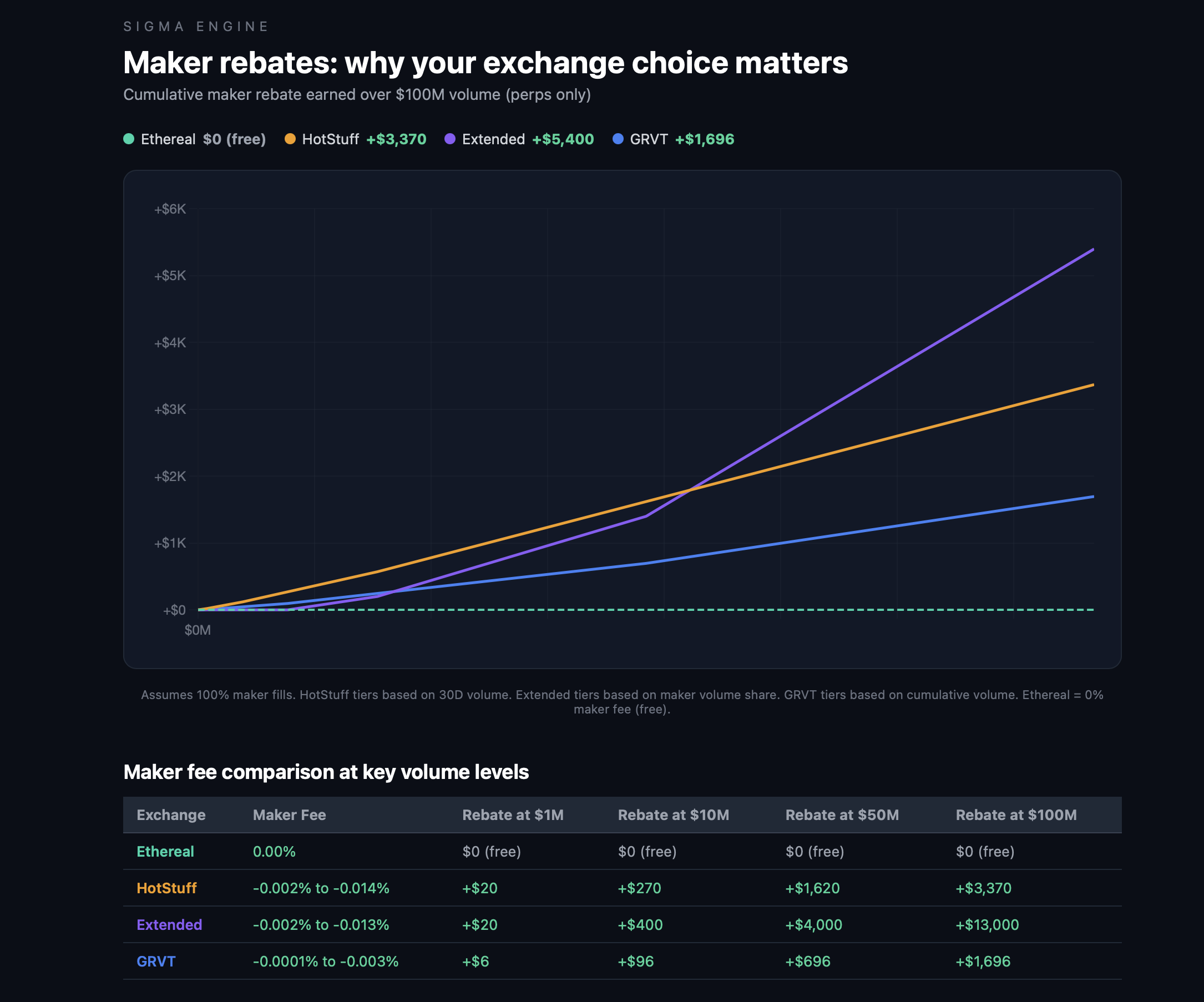
The difference compounds fast. A taker bot running $20M in volume would pay $2,500+ in fees. The same volume as a maker earns up to $5,400 in rebates depending on the exchange.
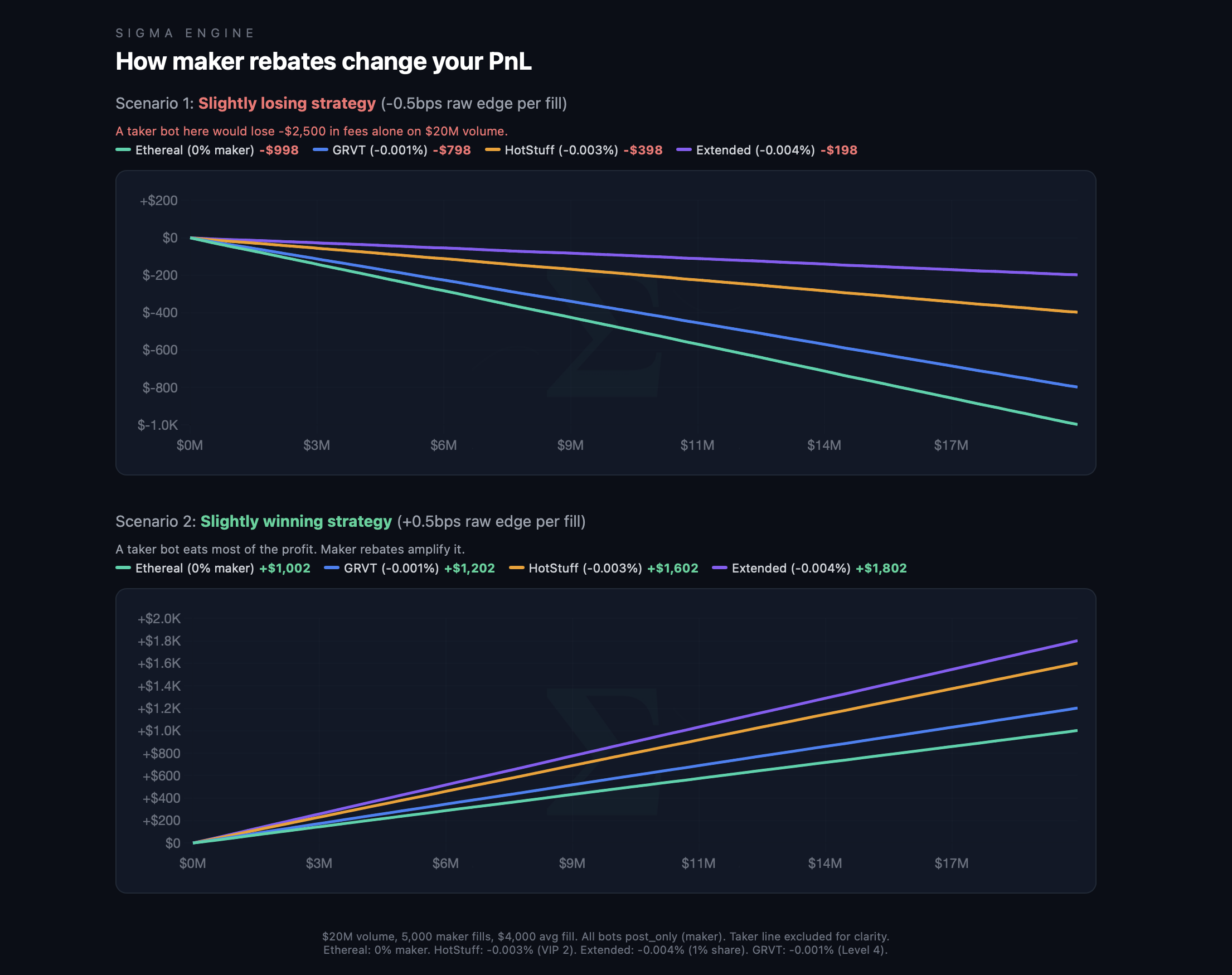
Even a strategy with a slight edge (-0.5bps raw) becomes profitable on exchanges with maker rebates. On a slightly winning strategy (+0.5bps), rebates can nearly double your returns. This is why exchange choice matters and why all Sigma Engine bots are maker-only by default.
Live — DEX
Ethereal
Description: Connect via WalletConnect — no private key needed
How to connect: Click Connect and approve via your wallet (MetaMask, Rabby, etc.). A linked signer is created automatically. Your private key is never shared or stored.
Builder fee: No — platform fees apply
Hyperliquid
Description: High-performance perpetual DEX
How to connect:
- Go to app.hyperliquid.xyz/API
- Click "Generate" then "Authorize API Wallet"
- Copy the API Private Key (shown once — save it)
- Paste it below along with your account address (top-right of app.hyperliquid.xyz)
Required fields: API Wallet Private Key, Account Address
Builder fee: Yes
DreamCash
Description: Hyperliquid frontend with Growth Mode (90%+ fee reduction)
How to connect: DreamCash runs on Hyperliquid. Use the same API wallet:
- Go to app.hyperliquid.xyz/API
- Generate and authorize an API Wallet
- Copy the API Private Key (shown once)
- Paste it along with your account address
Required fields: API Wallet Private Key, Account Address
Builder fee: Yes
Extended
Description: High-performance perpetual DEX
How to connect:
- Go to app.extended.exchange
- Navigate to Settings > API Management
- Create a new API key
- Copy all 5 fields: API Key, Stark Private Key, Stark Public Key, Vault Number, and Client ID
These are exchange-generated keys — not your wallet key.
Required fields: API Key, Stark Private Key, Stark Public Key, Vault Number, Client ID
Builder fee: Yes
GRVT
Description: Hybrid DEX with zk-rollup
How to connect:
- Go to grvt.io > Account > API Keys
- Create a new API key
- Copy: API Key, Private Key, and Trading Account ID
API keys are exchange-generated — your wallet key is never shared.
Required fields: API Key, Private Key, Trading Account ID
Builder fee: Yes — one-time on-chain builder authorization required after connecting
HotStuff
Description: L1 perpetual DEX — maker rebates on limit orders
How to connect:
- Go to app.hotstuff.trade and create an account
- Deposit USDC to your trading account
- Go to Settings → API and create an API agent
- Copy the API private key and your main wallet address
The API agent can trade but cannot withdraw funds. Broker authorization (one-time wallet signature) is required before orders can be placed.
Required fields: HotStuff Wallet Address, API Agent Private Key
Builder fee: Yes — broker approval required
TradeXYZ
Description: Commodities, FX, and equities on Hyperliquid (HIP-3 DEX). Growth Mode fees: 0.9bps taker / 0.3bps maker.
How to connect: TradeXYZ runs on Hyperliquid infrastructure — same wallet, same API keys:
- Go to app.hyperliquid.xyz/API
- Generate and authorize an API Wallet
- Copy the API Private Key (shown once)
- Paste it along with your account address
If you're already connected to Hyperliquid, use the same keys.
Available markets: Gold, Silver, Platinum, Copper, Brent Oil, WTI Oil, Natural Gas, EUR/USD, USD/JPY, S&P 500, TSLA, NVDA, AAPL, GOOGL, and 40+ more.
Required fields: API Wallet Private Key, Account Address
Builder fee: Yes
Hibachi
Description: Perpetual DEX on Arbitrum (invite-only)
How to connect:
- Go to hibachi.xyz > Account > API Management
- Create a new API key
- Copy: API Key, Account ID (UID), and Private Key (Secret)
These are exchange-generated credentials — not your wallet key.
Required fields: API Key, Account ID, Private Key
Builder fee: Yes
Pacifica
Description: Solana perpetual DEX — builder fee exchange
How to connect:
- Go to app.pacifica.fi > Settings > API Keys
- Click "Create API Key"
- Copy the API Secret (shown once)
- Your Account Address is your Solana wallet address (top-right of app.pacifica.fi)
The API secret is a signing key. It cannot withdraw funds.
Required fields: API Secret Key, Solana Wallet Address
Builder fee: Yes
Aftermath
Description: Sui-based on-chain perpetual DEX
How to connect:
- Go to aftermath.finance and create a perps account
- Click "Generate Agent Wallet" in the connection form — a dedicated trading key is created for you
- Go to aftermath.finance/agent-wallets and grant the agent address shown
- Enter your Account ID and click Connect
The agent wallet can trade on your behalf but cannot withdraw your funds.
Required fields: Aftermath Account ID
Builder fee: Yes
01 Exchange
Description: N1 Chain perpetual DEX — multi-protocol delta neutral
How to connect:
- Follow the 01 Exchange Setup Guide to generate session credentials locally
- Your main wallet key never leaves your machine
- Paste the Session ID, Session Key, and Wallet Pubkey into the Connections page
- Sessions last 30 days — re-run the script to renew
Required fields: Session ID, Session Key, Wallet Pubkey
Builder fee: No — platform fees apply
Live — CEX
Binance
Description: World's largest crypto exchange
How to connect: API Key + API Secret from Binance API Management. Enable Futures trading permission. Do not enable withdrawal permissions.
Role: Full trading + primary data source for CVD and taker delta signals in the Signal Brain
Bybit
Description: Popular derivatives exchange
How to connect: API Key + API Secret from Bybit API Management. Enable derivatives trading. No withdrawal permissions needed.
Role: Full trading + secondary data source for cross-exchange signal aggregation
Bitunix
Description: Futures exchange — no KYC, no geo restrictions
How to connect: API Key + API Secret from Bitunix API settings.
Note: Free bot usage with referral link signup.
Nado
Description: Perpetual DEX with linked signer model
How to connect:
- Go to nado.trade and create an account
- Generate a linked signer (dedicated trading wallet)
- Copy the private key and subaccount name
The linked signer can trade but cannot withdraw funds.
Required fields: Private Key, Subaccount Name
Builder fee: Yes
Coming Soon
These exchanges have partially completed client implementations and are in testing.
| Exchange | Type | What to expect |
|---|---|---|
| Backpack | DEX — Solana | ED25519 API key — Public Key + Secret Key from backpack.exchange > Settings > API |
| Lighter | DEX — Arbitrum | Per-account API key indices — up to 253 keys per account, each with own private key |
Security Model
No exchange integration requires your main wallet private key for any supported exchange.
| Method | Used By | Withdrawal Risk |
|---|---|---|
| WalletConnect linked signer | Ethereal | None — signer can trade, not withdraw |
| Exchange API wallet | Hyperliquid, DreamCash, TradeXYZ, HotStuff | None — API wallet is a delegate with no withdrawal rights |
| Exchange API key | Extended, GRVT, Hibachi | None — API keys are exchange-generated with configurable permissions |
| Session key (local generation) | 01 Exchange | None — session key can only trade, main wallet key stays on your machine |
| Agent wallet | Aftermath | None — platform-generated key, grant-based trading authorization |
| Linked signer | Nado | None — dedicated trading wallet with limited permissions |
| Solana API key | Pacifica | None — signing key only, no withdrawal capability |
See Connection Security for full details.