Terminal
The terminal is your primary trading interface. It combines live charts, order book, position management, and bot monitoring in one view.
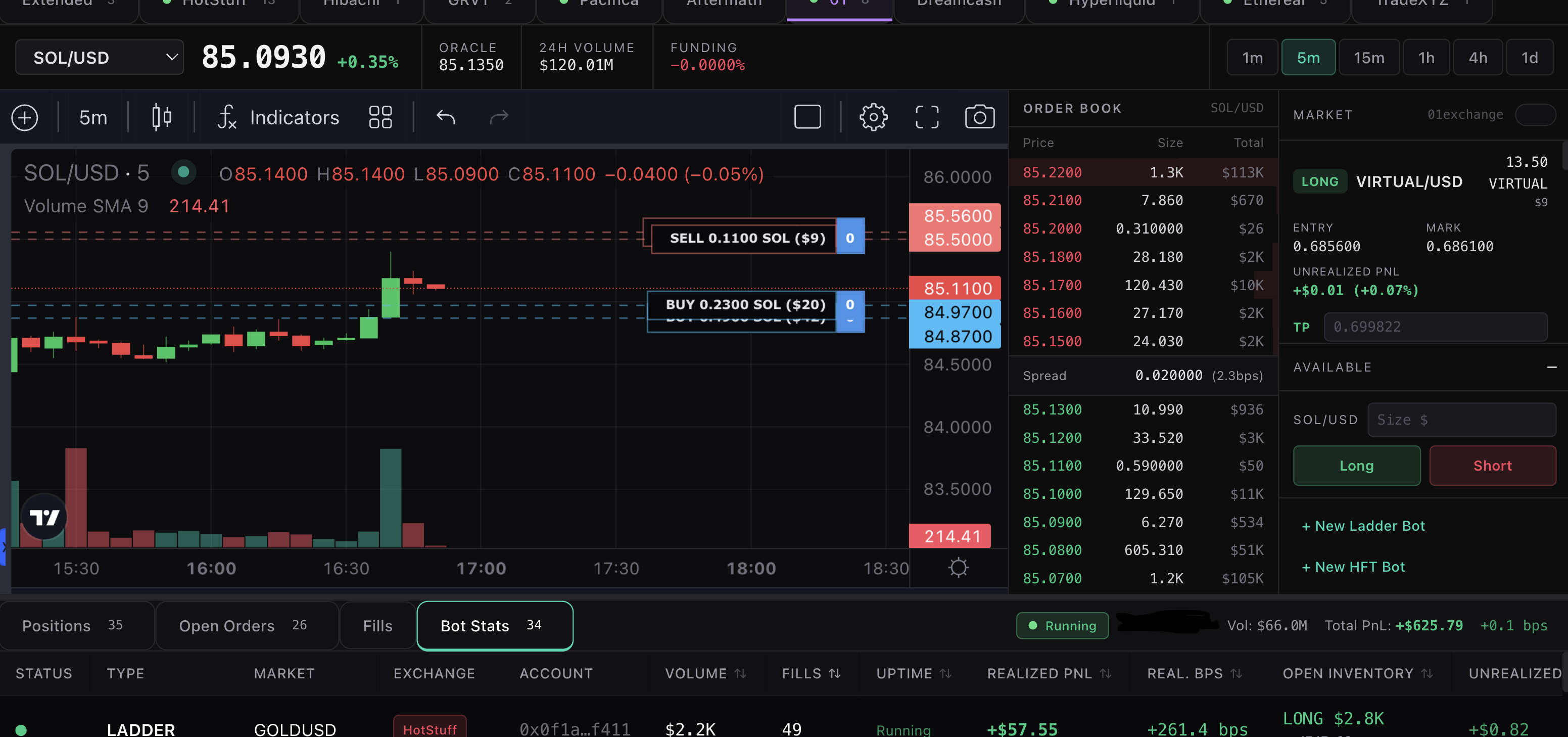
Layout
Exchange Tabs
The top row shows all your connected exchanges with the number of active bots on each. Click an exchange to switch - the chart, order book, positions, and bot stats all update to show that exchange's data.
Live Ticker
The scrolling bar at the top shows top-performing bot configurations from other users (anonymized). Each entry shows the bot type, market, exchange, PnL, and spread. Click "Copy" to load those settings directly into the Strategy Builder.
Chart
Live candlestick chart powered by TradingView. Supports multiple timeframes (1m, 5m, 15m, 1h, 4h, 1d). Your bot's entry price and position are shown as an overlay on the chart. The coin selector in the top-left lets you switch between all available markets on the selected exchange - crypto, stocks, commodities, and indices.
Order Book
Live order book depth for the selected market. Shows bid/ask prices, sizes, and total notional at each level. Updates in real-time via WebSocket where available.
Position Panel
The right sidebar shows your open positions across all markets on the selected exchange. For each position:
- Side (LONG/SHORT), market, and notional value
- Entry price and current mark price
- Unrealized PnL in USD and percentage
- TP/SL inputs - set take profit and stop loss prices directly from the terminal
- Close - close the position immediately
- Stop Bot - stop the bot managing this position
The panel can be minimized to give the chart more space.
Bottom Tabs
Positions
All open positions across the selected exchange with entry price, size, and unrealized PnL.
Open Orders
All standing limit orders placed by your bots. Shows price, size, side, and which bot placed them.
Fills
Recent trade fills with timestamps, prices, sizes, and PnL per fill.
Bot Stats
Full table of all running bots across all exchanges. Shows:
- Status, bot type, market, exchange
- Volume, fills, uptime
- Realized PnL (USD and bps)
- Open inventory and unrealized PnL
- Take profit and stop loss settings
- Actions: Close Position, Restart, Stop
Multi-Exchange View
Switch between exchanges using the tabs. Each exchange shows its own set of markets, positions, and bots. The coin selector updates to show only the markets available on the selected exchange.
Supported venues include Ethereal, Hyperliquid, HotStuff, Extended, Hibachi, Pacifica, GRVT, 01 Exchange, HyENA, Aftermath, and TradeXYZ (stocks and commodities via Hyperliquid).