Auto Delta Neutral (Pro Trader)
The Pro Trader's Auto Delta Neutral mode monitors your positions on a second exchange and actively hedges to keep your total portfolio exposure near zero.
Configuration
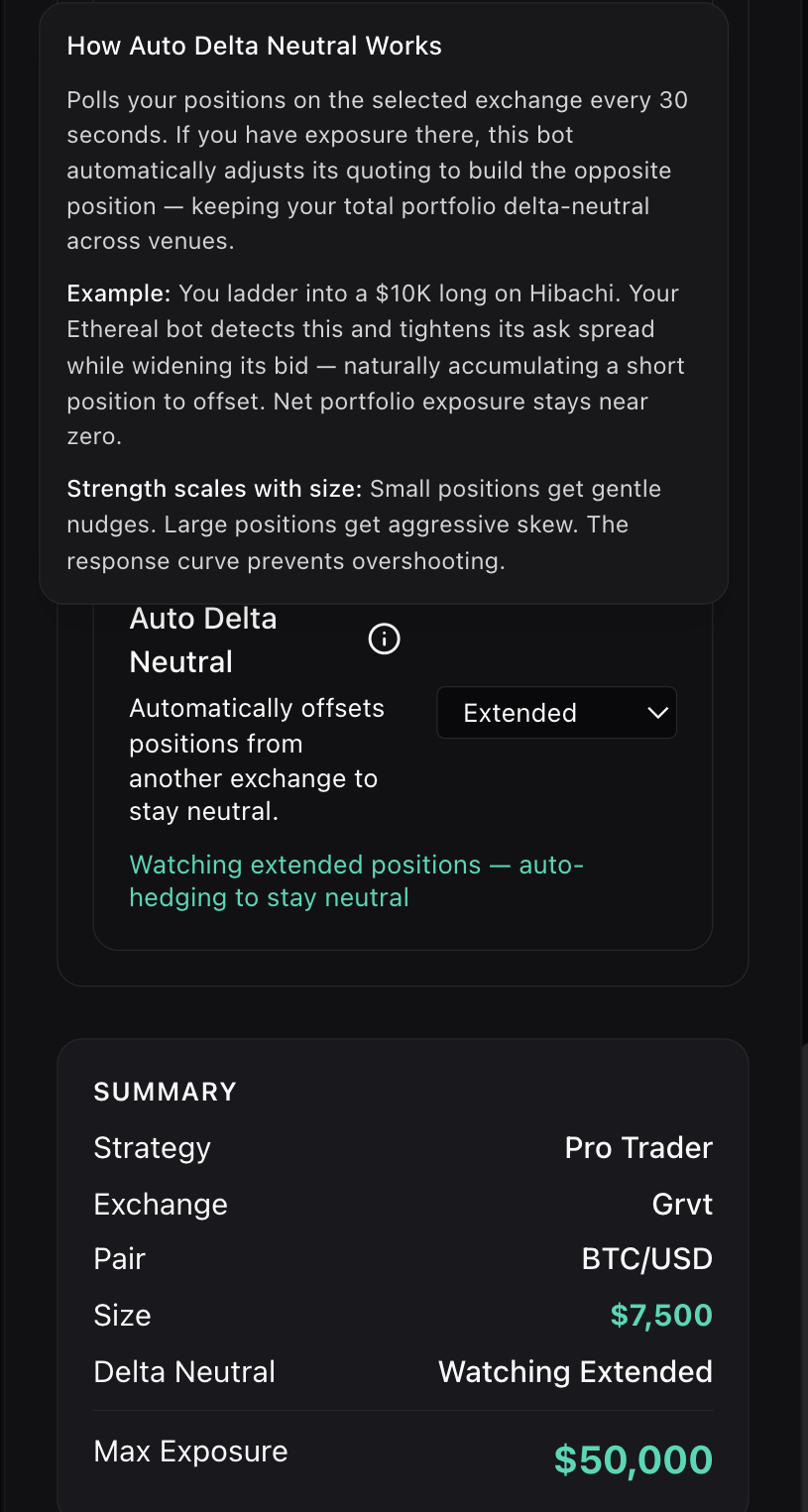
In the Pro Trader configuration panel, scroll to the Auto Delta Neutral section. Select the exchange you want to watch from the dropdown. The summary panel confirms your DN setup, watched exchange, and Max Exposure.
How It Works
The system polls your positions on the watched exchange every 30 seconds. When it detects exposure, the Pro Trader adjusts its quoting to build the opposite position on its exchange.
Example: You ladder into a $10K long on Hibachi. The Pro Trader on GRVT detects this, tightens its ask spread, and widens its bid — naturally accumulating a short position to offset. Net portfolio exposure stays near zero.
Pro Trader vs. Ladder Bot DN
Both strategies support Auto Delta Neutral, but they hedge differently:
| Pro Trader | Ladder Bot | |
|---|---|---|
| Hedging style | Active — adjusts quoting aggressively based on signal confluence | Passive — symmetric spread skewing only |
| Signal integration | Full signal engine drives directional bias alongside DN skew | No signal integration, pure mechanical offset |
| Position management | Builds and exits positions with trailing TP, conviction scaling | Holds ladder levels, exits at spread capture |
| Speed | Faster hedge accumulation due to HFT cycle times | Slower, relies on natural fill flow |
| Best for | Traders who want signal-driven execution with portfolio-level hedging | Traders who want simple, mechanical spread capture with DN overlay |
Max Exposure
The Max Exposure field in the summary (shown as $50,000 in the screenshot) represents the maximum portfolio-level inventory the bot will hold — not the per-order size.
This is the upper bound on how large a position the Pro Trader will build across all its activity, including DN hedging. If the bot's position reaches Max Exposure, it enters exit-only mode and stops placing new orders on that side.
Max Exposure is not order size. A $7,500 order size with $50,000 max exposure means the bot places $7,500 orders but can accumulate up to $50,000 in total position before it stops building.
Delta Drift
Delta drift measures how far your combined position has deviated from true neutral. Even with a perfectly hedged entry (long on one venue, short on another), drift accumulates over time as:
- Price divergence between venues — the long and short sides don't move in perfect lockstep. One exchange may lag or lead, creating a temporary imbalance in unrealized PnL.
- Partial fills — if one side fills before the other, you're temporarily directionally exposed until the hedge catches up.
- Funding rate asymmetry — funding payments are collected/paid at different rates on each venue, causing the net PnL to drift from zero.
The Delta Drift gauge on the DN dashboard shows this in real time:
| Drift | Status | Meaning |
|---|---|---|
| < 0.5% | Green | Healthy — position is near-neutral |
| 0.5% – 2% | Amber | Drifting — monitor closely, may self-correct |
| > 2% | Red | Significant drift — consider rebalancing or closing |
When drift exceeds your comfort threshold, you can rebalance by adjusting position size on one leg, or close the position entirely. The bot's TWAP exit system handles closing both legs simultaneously with maker-only execution to minimize slippage.
Requirements
- Watched exchange must be connected on the Connections page
- Both venues must support the same trading pair
- The Pro Trader must be running (DN polling only happens while the bot is active)
- Sufficient balance on the Pro Trader's exchange to build the hedge position